A Professional's Take on the New Epiqvision Flex Co W01
The visual landscape of the modern workplace and home office has undergone a radical transformation over the last few years. As professionals increasingly juggle hybrid schedules, the demand for versatile, high-performance display technology has moved beyond the static conference room monitor. In this shifting environment, the Epson EpiqVision Flex CO-W01 Smart Streaming Projector emerges as a potential solution for those who require a large-scale, portable, and high-quality visual output without the permanence of a 75-inch television or the limitations of a standard laptop screen. This article provides a professional analysis of the CO-W01, examining its technical specifications, real-world utility, and how it fits into the broader consumer electronics market.
Understanding the Value Proposition
When evaluating professional-grade hardware, the first question is always: what problem does this solve? For years, the affordable projector market was bifurcated between bulky "business" projectors with high brightness but poor color, and "home theater" projectors that were beautiful but too dim and fragile for travel. The EpiqVision Flex CO-W01 is Epson’s attempt to bridge this gap. Designed with a sleek, minimalist aesthetic, it targets the mobile professional who might lead a sales presentation in a brightly lit office at 10 AM and host a family movie night at 8 PM. It is a tool built for flexibility, leveraging 3LCD technology to ensure that the compromises typically associated with portable projection—specifically "rainbow effect" and muted color—are largely mitigated.
Comprehensive Product Review: Design and Hardware
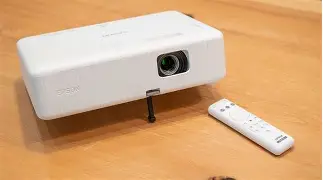
The first thing one notices about the CO-W01 is its footprint. Unlike the industrial, vented look of older Epson models, this device features a clean, white, matte finish with rounded edges and a hidden lens design. It lacks the aggressive cooling grilles and exposed glass that often make projectors look daunting to the uninitiated. This design choice is intentional; it allows the device to blend into any decor, whether it is sitting on a Scandinavian-style coffee table or a glass boardroom desk.
Internally, the hardware is centered on Epson’s proprietary 3LCD technology. This is a critical distinction for professionals. Many competitors in this price bracket use single-chip DLP technology, which relies on a spinning color wheel. While DLP can be sharper, it often suffers from "color breakup" or the rainbow effect, which can cause eye strain during long sessions. By using three individual LCD chips to display the full RGB signal 100% of the time, the CO-W01 offers a more stable and comfortable viewing experience, which is essential when analyzing spreadsheets or watching long-form content.
Brightness and Image Quality
In the world of projection, brightness—measured in lumens—is king. The CO-W01 boasts a rating of 3,000 lumens of both color and white brightness. This is a significant figure. In a professional context, "color brightness" refers to the intensity of the red, green, and blue light. Many budget projectors claim high "white brightness" but have dismal color brightness, resulting in images that look washed out and muddy. Because the CO-W01 balances these two, the colors remain vibrant even in environments with moderate ambient light. While it is not designed to fight direct midday sunlight, it handles indoor fluorescent lighting and curtained living rooms with impressive competence.
The resolution is WXGA (1280 x 800), which is a 16:10 aspect ratio. For the modern professional, this is a strategic choice. While many home-centric devices opt for 1080p (16:9), the 16:10 ratio provides slightly more vertical space, which is highly beneficial for displaying documents, sidebars in presentation software, and traditional office applications. While videophiles might lament the lack of native Full HD or 4K, at the typical viewing distance and projected size (up to 300 inches), the clarity for text and video remains more than sufficient for most users.
Connectivity and Smart Integration
In a world of "smart" everything, the CO-W01 does not lag. It integrates Android TV directly into the hardware experience. This eliminates the need for external dongles or cables when streaming content. However, for the professional, the HDMI port remains the most important gateway. Whether connecting a MacBook, a PC, or a specialized medical or architectural imaging device, the plug-and-play nature of the CO-W01 is a major selling point. There is very little "fiddling" required with menus; the auto-source detection is quick and reliable.
The audio department features a built-in speaker, though, as with most portable projectors, it is functional rather than cinematic. It is perfectly adequate for a Zoom call or a simple presentation in a quiet room. However, professionals using the device for multimedia-heavy applications will likely take advantage of the Bluetooth connectivity or HDMI ARC to route sound to more robust external speakers.
Find top-rated Electronics products at great prices.
View Offers →Real-World Use Cases
To truly understand the Flex CO-W01, we must look at how it performs in various professional and personal scenarios. Buyers typically look for reliability, ease of setup, and visual impact. Let us explore three primary use cases.
The Traveling Sales Representative
For a sales professional, your equipment must be an extension of your confidence. Walking into a client’s office and struggling for ten minutes to find a cable or focus a lens is a morale killer. The CO-W01’s lightweight frame (under 6 lbs) and quick-start capabilities mean it can be set up on a desk, pointed at a wall, and focused within sixty seconds. The high lumen count ensures that even if you can't find the light switch in a client's conference room, your pitch remains visible and professional.
The Small Business Educator
Teachers and independent workshop leaders often face unpredictable environments. A community center might have windows that don't have blinds, or the only available wall might be off-center. The CO-W01 includes horizontal and vertical keystone correction, allowing the user to square the image even if the projector is sitting at an odd angle. This flexibility is vital for educators who don't have the luxury of a fixed mounting solution.
The Hybrid Home-Office Enthusiast
During the day, the CO-W01 serves as a secondary or tertiary monitor for deep analytical work. Using a projector as a monitor can reduce the neck strain associated with hunched-over laptop use. Once the workday ends, the Android TV interface allows a seamless transition to streaming. The capability to project a 100-inch image in a small apartment without needing a dedicated TV stand is a benefit that echoes the "minimalist professional" lifestyle.
Pros and Cons
Every piece of technology involves trade-offs. To provide an objective professional opinion, we have categorized the strengths and weaknesses of the EpiqVision Flex CO-W01 below.
- Pros: High Color Brightness — The 3,000 lumens of color brightness ensure that images don't look pale or ghostly in typical indoor lighting.
- Pros: 3LCD Technology — Eliminates the "rainbow effect" found in many portable DLP projectors, making it safer for people with sensitive vision.
- Pros: Compact and Lightweight — Weighing roughly the same as a professional laptop, it fits easily into a briefcase or backpack for transit.
- Pros: Integrated Android TV — Simplifies the user experience for those who want to use the device without a computer.
- Pros: Advanced Keystone Correction — Allows for a square image in non-ideal setup locations, increasing versatility.
- Cons: WXGA Resolution — While great for text, it is lower than the 1080p or 4K resolutions found in dedicated home theater models.
- Cons: Limited Audio Output — The internal speaker is sufficient for voice but lacks the bass and depth required for high-fidelity audio.
- Cons: Fixed Focal Length — It lacks a optical zoom lens, meaning you have to physically move the projector forward or backward to change the image size.
Technical Specification Comparison
To help prospective buyers understand where the CO-W01 sits in the hierarchy of modern projection, the following table compares its key features against typical competing categories.
| Feature | EpiqVision Flex CO-W01 | Standard Budget DLP Projector | Fixed Installation Business Class |
|---|---|---|---|
| Brightness | 3,000 Lumens (Color/White) | 2,000 - 3,000 Lumens (Total) | 4,500+ Lumens |
| Display Tech | 3LCD (3-Chip) | Single-Chip DLP | 3LCD or High-End Laser |
| Resolution | WXGA (1280 x 800) | 1080p (1920 x 1080) | WUXGA (1920 x 1200) |
| Portability | High (Portable Design) | High (Pocket/Portable) | Low (Fixed/Mountable) |
| Ease of Use | Smart (Android TV Built-in) | Manual Connectivity only | Complex (Networked/Managed) |
Professional Buying Guide
Selecting a projector requires an honest assessment of your environment and your content. If you are considering the EpiqVision Flex CO-W01, keep the following professional criteria in mind to ensure it matches your workflow.
Consider Your Ambient Light
Assess where you will use the device most frequently. If your intended use is in a glass-walled office with no curtains during peak daylight, you might need a much higher lumen count (above 5,000). However, if you are in a standard office or a home with controllable lighting, the CO-W01 provides a sweet spot of performance and price. Remember that projection is an additive light process; the more light in the room, the less contrast you will see.
Find top-rated Electronics products at great prices.
Browse Now →Resolution vs. Functionality
Professionals often get caught in the "resolution trap," believing that 4K is necessary for everything. However, for a projector frequently used for PowerPoint, PDF reviews, and casual video, WXGA is often more than enough. The 16:10 aspect ratio of the CO-W01 is specifically designed for productivity. If your primary goal is high-end gaming or watching 4K Blu-rays, this is not the device for you. If your goal is multitasking and versatility, the resolution is a non-issue.
Portability and Setup Space
The CO-W01 does not have an optical zoom. This means the "throw ratio" is fixed. To get a bigger image, you must put the projector further back. Before purchasing, measure your room. If you are in a very cramped space and can only place the projector three feet from the wall, you will get a smaller image than someone who can place it ten feet back. The absence of optical zoom is one of the ways Epson kept the device light and affordable, so ensure your space accommodates a physical "zoom" (moving the unit).
Maintenance and Lamp Life
Modern Epson lamps are incredibly durable. The CO-W01 is rated for up to 12,000 hours in "Eco Mode." For a professional using the device for three hours every single day, the lamp would last over ten years. This is a significant improvement over the projectors of a decade ago, which often required expensive bulb replacements every year or two. When calculating the total cost of ownership, the longevity of the lamp makes the CO-W01 an economically sound investment.
The Final Verdict
The Epson EpiqVision Flex CO-W01 is a disciplined piece of hardware. It does not try to be a high-end cinema projector, nor does it try to be a permanent, heavy-duty installation unit. Instead, it hits a very specific and underserved target: the "flex" user. It offers enough brightness to be usable in the daytime, enough color accuracy to satisfy visual professionals, and enough smart features to be a legitimate entertainment hub.
For the professional who values time and simplicity, the combination of 3LCD technology and Android TV is a winning formula. It eliminates the frustration of cables and the visual artifacts of cheaper DLP units. While the resolution and internal audio have their limitations, they are balanced by the device's extreme portability and robust brightness. If you are looking for a reliable, multi-purpose tool that can transition from a morning boardroom meeting to a late-night backyard cinema session without breaking a sweat, the CO-W01 is one of the most practical options on the market today.
In conclusion, the EpiqVision Flex CO-W01 succeeds because it respects the user’s need for versatility. It acknowledges that the boundaries between work and life have blurred and provides a visual solution that is equally comfortable in both worlds. Its professional-grade brightness and consumer-friendly interface make it a standout choice for those who demand performance without complexity. Whether for increasing productivity or enhancing leisure, it is a piece of electronics that truly earns its space in a professional toolkit.